How to Approach This

I'm working on a model of a UK Traffic Light. High Poly at this stage but will later bake onto a Low Poly for UDK.
I've built the signal box and am trying to work out if I'm going about it in the best way. I have this
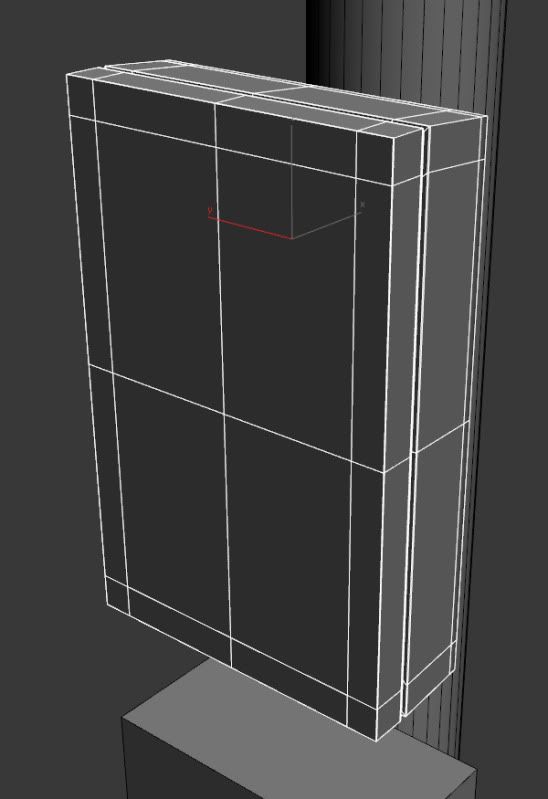
Which after turbo smoothing looks like
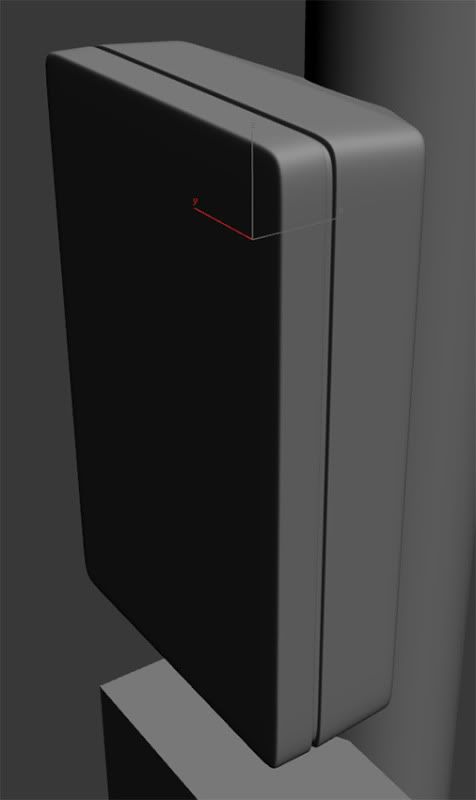
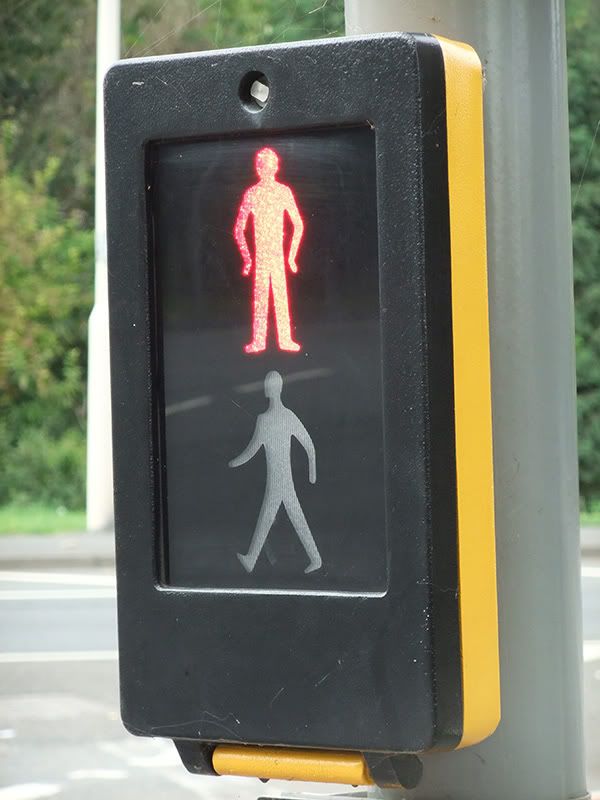
But not I need to work out how to cut in the screen while still keeping edges to hold the corners for turbosmooth. See reference below. I guess I could float them over the top but would prefer to learn how to make a solid object and I may have a use for the H/P later. I would also need to cut in the circle at the top for the lock/bolt.
All thoughts are welcome.
I've built the signal box and am trying to work out if I'm going about it in the best way. I have this
Which after turbo smoothing looks like
But not I need to work out how to cut in the screen while still keeping edges to hold the corners for turbosmooth. See reference below. I guess I could float them over the top but would prefer to learn how to make a solid object and I may have a use for the H/P later. I would also need to cut in the circle at the top for the lock/bolt.
All thoughts are welcome.
Replies
don't relie on the subdivision to give you the curved corners bevel them to the shape you want and use subdivision to smooth them out more.
you should never relie on subdivision to make a shape.
just chamfer/bevel your corner edges(maybe twice), than inset the front and back face once or twice to create a support loop, and cut 2 edge loops down the width.
here is a very quick and dirty example i made im in a few seconds.
Awesome high poly models aren't 16polys that happen to turbosmooth into the right shape, round that stuff out on your own.
Also with something that flat you could easily float that inset detail and would probably bake ok. But then again it wouldn't be much work to inset it properly anyway...
ya anytime, what i did was mostly basic stuff expect for the bolt hole used the vertex chamfer trick for that.
Also, we have a big stickied thread specifically for these sort of questions: http://www.polycount.com/forum/showthread.php?t=56014
Really this is the same topology as passerby's, but just different geo in the corners. Its not how much geo you've got in the corners, but transition to the cutout that matters.
yours has less verts so it is easier to tweak the shape after the fact, but with my it is very easy to optimize and make your LP version using the same geo, and have it actually match up properly for the normal bake.
What he wanted to do had nothing to do with how detailed or not detailed the corners were, it was the flow into the inset area that mattered.
So the "more geo" as a response to his problem doesn't make much sense.
since the surface is planar you can get a away with ngons and messy geometry. Just weld stuff up and terminate loops onto the loops for the box object.
This is a quote to live by lol. It took me ages to actualy understand the implications of this rule, it makes creating both high res and low res meshes much easier in the long run. Also just to point out, you should try and model seperate pieces as they are on the real world version i.e - the yellow and black sections of the box are two seperate pieces so model them seperately.
By all means model them together to begin with but when it comes to adding control edge loops its generally better to seperate elements as they should be. Among other things this open edge inside the model makes it easier to terminate edge loops instead of having them unnecesarily trailing all round the mesh.
I think he should work out the corners then he can work on the inner topology.
For the little guy I would use the spline to outline the shape then convert it to Edit Poly, shell it, then ProBoolean it, define a few edges and go from there. I know everyone freaks out "booleans are the devil! They make a mess!" only if you don't know what they're going to do and they normally only get crazy messy on crazy messy geometry.
and if your that against it just don't do the boolean, and unable snapping and use the spline as a guide for using the cut tool.
Also, i'm not sure about you guys, but to round the corners on a mesh like this on the low it takes two clicks, you literally do it in just a few seconds:
Depending on how complex your curve is in the high, you may need to adjust to account for the "shrinking" of the sub-d mesh, so you can't always just take your cage and optimize it, it would likely be off a bit unless you had a lot of sides to the curve. So then you're tweaking the curve after the fact and that takes more time than just quickly recreating in the low.
There is more to think about sometimes, IMO in this case the absolutely fastest thing to do is model like I did, then take the 2 seconds to bevel/chamfer the corners in the low, really simple, really clean, really fast.
With a more complex asset I would probably do something different, but there's no need to out-think yourself for something like this.
RE: the little man: Unless you're going to have a glass pane modeled with alpha there on top of it, there is no reason to model in the depth here. You wouldn't want that normal detail if you were trying to mimick the reflective properties of the glass/plastic pane that is on top of it.