|
created Baking normals - HUGE issue
on 07-31-2011 02:42 PM
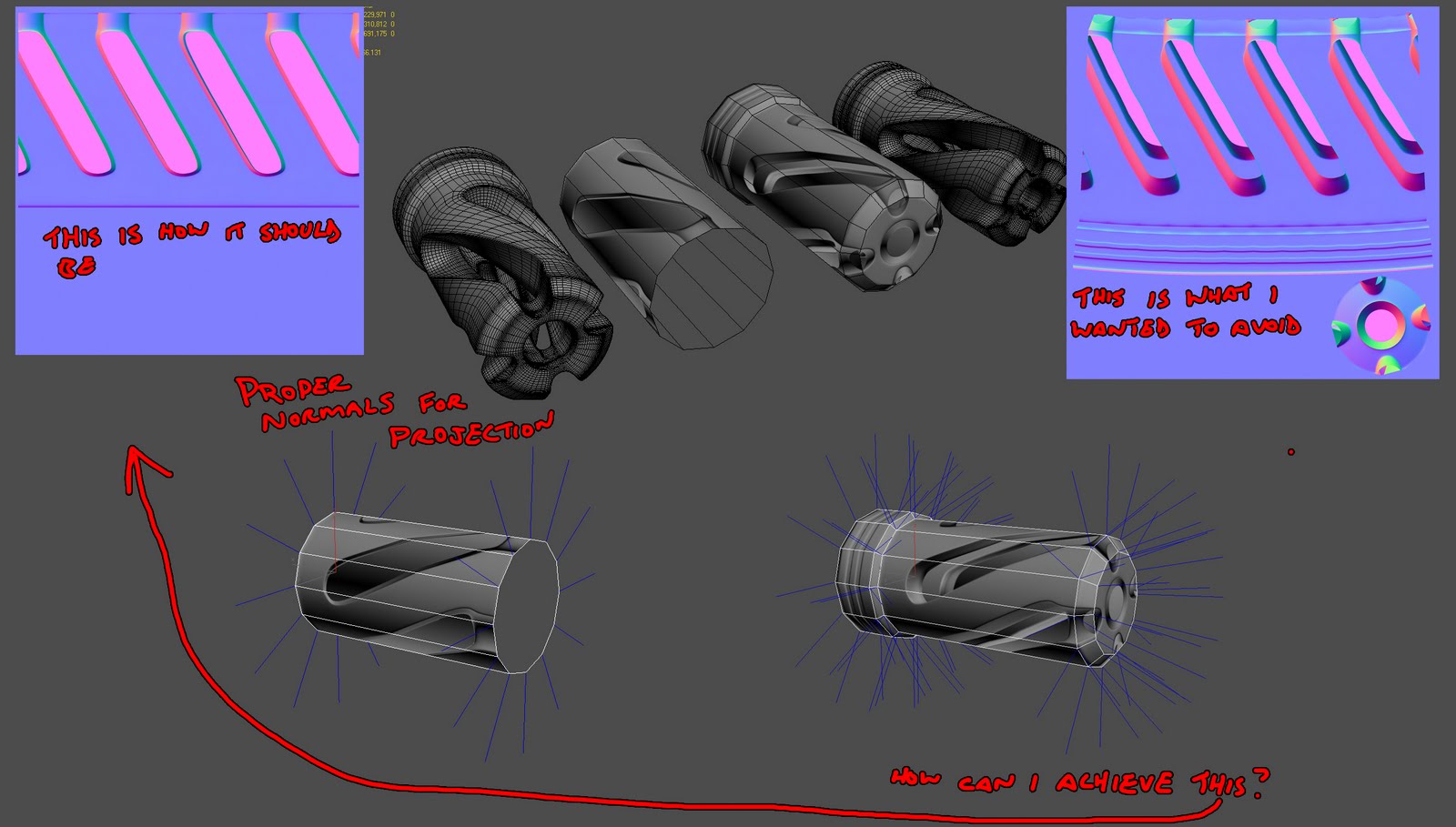
so i hope the image can explain everything but ill try here anyway. Im trying to bake this high poly piece down to a cylinder. with the cylinder by itself, it renders fine. or fine enough for what i want out of it. now here's my issue, when i start adding in the rest of the segments, the normals of the object change and i get different results when baking. anyone know any way i can fix this?
|
, card carrying polycounter,
2,031 Posts,
Join Date Apr 2007,
Location Belmont, CA
|
That's a pretty funky piece to bake out, if you want the normals not to change, you can always realign them once you've added your subdivisions, so that they stay aligned like a simple cylinder. Should bake out a bit better... Will still kind of look weird in my opinion.

|
, polycounter,
1,011 Posts,
Join Date Jun 2006,
Location Paris / France
|
I think it would be much easier (and better looking!) to have the negative cutouts actually part of the lowpoly!
Good luck, this piece could look very cool!
|
, veteran polycounter,
4,949 Posts,
Join Date Oct 2004,
Location Irvine CA
|
add tight control loops to the ends of the large cylinder shape. The vert normals will point the right direction.
|
|
@pior: yeah i thought so too. but it would require too much geometry i think
@perna: ill give it a shot
|
, card carrying polycounter,
2,031 Posts,
Join Date Apr 2007,
Location Belmont, CA
|
Quote:
Originally Posted by Oniram
@pior: yeah i thought so too. but it would require too much geometry i think
|
Its gonna look pretty crap if you don't, which would be an awe-full shame given the HP is so nice.
|
, veteran polycounter,
2,970 Posts,
Join Date Feb 2010,
Location Ireland
|
well this shape isnt good thing to bake imo, i would either model it or model different shapes that would bake better
but u can try to put a cylinder in the hi poly so it wont bake the inner part like its on top
|
, polycounter,
1,150 Posts,
Join Date Jul 2005,
|
i have 2 options in front of me. i can use a cylinder with slightly modeled in dents in the front area. will have a low polycount but probably not be as convincing. or i can model it all in (i just did), but the polycount on it is roughly 750 tris, but will result in a better bake....... what to do what to do? i have no issue with using the higher tri count one, but i know that will get me some yelling at by some people here. lol.
|
, card carrying polycounter,
2,031 Posts,
Join Date Apr 2007,
Location Belmont, CA
|
double post. here's how it came out. some issues where there are breaks in the UVs, but nothing that bad i think. especially if it will be seen from fpv. im still skeptical however on keeping it, opposed to the plain cylinder.

|
, card carrying polycounter,
2,031 Posts,
Join Date Apr 2007,
Location Belmont, CA
|
If it's seen from FPV, then no way in hell would a cylinder give you anything remotely close. And, if it's seen from FPV, you should be giving it tons of geo love.
|
, polygon,
706 Posts,
Join Date Nov 2006,
|
What platform / target is this for, and who are these sinister hate-mongers who will give you a hard time about 750 tris? Of course, it does depend whether this is a huge part of your asset, or tiny ;)
|
, polygon,
706 Posts,
Join Date Nov 2006,
|
haha, talk about extremes.. your first model had a silly low polycount, and this one has a silly high polycount, why not find some middle ground there..
You can use your original mesh with two additional loops like I suggested (and get rid of that collapsed vert at the end of the cylinder). Just make sure you edit your hipoly, as currently there's no bevel that will give the impression of depth in the normal map, so it wouldn't look very good.
|
|
u can optimize it alot more and keep the shape
|
, polycounter,
1,150 Posts,
Join Date Jul 2005,
|
@Ott: well its just for a portfolio piece. and as far as the use of this, its the muzzle break on an SMG. which is why i was concerned about it being in FPV, because its the furthest thing from the camera on the gun. here's a shot of the hi poly so you can get a better understanding .
http://4.bp.blogspot.com/-vmxGDP-lEc...SexyHP09-4.jpg
http://2.bp.blogspot.com/-nIEm9rj_hp...xyHP09-FPS.jpg
in general i usually get yelled at by loads of people for my "low poly" stuff because its always apparently too high. lol. but its a learning process.
@Perna: yea, ill see if i cant optimize the higher one a bit more first. if i cant then i will go back and change the high. should be super simple to do.
@Lonewolf: ill try.
|
, card carrying polycounter,
2,031 Posts,
Join Date Apr 2007,
Location Belmont, CA
|
The biggest problem here is you've got holes and gaps in your mesh. The renderer doesn't know what to do with this sort of data, and its going to raycast onto something random.
In your "This is how it should be" example, you have those pink normals which are just facing in some random direction, both methods you show there are bad.
To get this result with a simple lowpoly, you want a fully capped mesh, no holes etc. The renderer can't read your mind to fill in the gaps. You need to think about this in terms of what the baker is seeing, then why you're having issues makes perfect sense.
So, we start with a capped mesh:
Assign mat colors to the "holes"
Model simple lowpoly
Bake normals+rgb, and make sure the holes are completely black in both diffuse and spec:
So, not really a baking problem, aside from having unrealistic expectations of how something will bake, but more of a modeling problem. Its the content the baker is looking at, not *how* the baker is looking at it.
With a relatively small part of your model, plus that fact that it would be unlikely to be seen up close(or at all) in FPV view, using this sort of "fake hole" workflow is the simplest solution. If its for a portfolio, modeling a more interesting lowpoly might be a good idea, but you still need to cap those holes.
Last edited by EarthQuake; 08-01-2011 at 09:09 AM..
|
, Moderator,
8,632 Posts,
Join Date Oct 2004,
Location Iowa City, IA
|
You can also do something like this, with deep cutouts(but capped) to get the AO in there instead of the "fake hole" route.

|
, Moderator,
8,632 Posts,
Join Date Oct 2004,
Location Iowa City, IA
|
wow EQ. thanks for that! i think i may go ahead with the lower poly example, even if it is for a portfolio piece, i would still kind of want to keep it within limits of a production budget. this is what you guys did for the brink guns.. yeah?
|
, card carrying polycounter,
2,031 Posts,
Join Date Apr 2007,
Location Belmont, CA
|
I want to have babies with EQ.
And damn, that's a nice fine HP  Your concerns about the tri count make a little more sense since it is so far away from camera. And yep, the best way to mimic a hole is to over accentuate the normals and fake it in the material / textures as EQ pointed out 
|
, polygon,
706 Posts,
Join Date Nov 2006,
|
Quote:
Originally Posted by Oniram
wow EQ. thanks for that! i think i may go ahead with the lower poly example, even if it is for a portfolio piece, i would still kind of want to keep it within limits of a production budget. this is what you guys did for the brink guns.. yeah?
|
I do a bit of both(the "fake hole" stuff, and proper modeling). The customizable muzzle flashes in brink, we used a few tricks there. Sometimes it was just raw modeling, sometimes fake holes or other solutions. It depended on the design for each, I think the tricount was 500 tris for each custom muzzle, so that should give you an idea of what to shoot for.
These muzzles were seen up close in the weapon screen more than anything though, and on many guns you can barely see them when in-game. But yeah, for something cool in your folio, 500 tris is fine I'm sure.
|
, Moderator,
8,632 Posts,
Join Date Oct 2004,
Location Iowa City, IA
|
Quote:
Originally Posted by EarthQuake
I do a bit of both(the "fake hole" stuff, and proper modeling). The customizable muzzle flashes in brink, we used a few tricks there. Sometimes it was just raw modeling, sometimes fake holes or other solutions. It depended on the design for each, I think the tricount was 500 tris for each custom muzzle, so that should give you an idea of what to shoot for.
These muzzles were seen up close in the weapon screen more than anything though, and on many guns you can barely see them when in-game. But yeah, for something cool in your folio, 500 tris is fine I'm sure.
|
Did you leave any holes in the muzzles (EI: parts which player won't see = deleted polygons) or was it all capped for engine/performance reasons like UDK?
There's a very good chance that I experienced MORE problems, then all the internet put together in the area of 3D. Talk about being original for once...
|
, veteran polycounter,
4,501 Posts,
Join Date Apr 2011,
Location Canada
|
so i got everything baked down and it turned out great. thx for the help. now here's something that i guess could be addressed here as well. i did 2 test bakes. 1 with smoothing groups. 1 without. from what ive read and been told, you dont really need smoothing groups ever, tho its best to avoid gradients in your normals if possible. is that correct? the 2 look fairly similar on the model with only slight differences on edges, but knowing that the non-smoothing group one is "more efficient", how would that transfer to an engine? as of now im just viewing it with 3ps.

|
, card carrying polycounter,
2,031 Posts,
Join Date Apr 2007,
Location Belmont, CA
|
If your model includes a lot of 90 degree angles, use smoothing groups. If it's organic, 1 smoothing group would do fine.
If you use 1 smoothing group on something non-organic you will get these huge gradients, while fine in 3ds.. some times, will give you weird looking lighting artifacts in udk.
Oh and your original problem, I had an error like that too. Turns out I was capturing the mesh data from the other side of the model through the holes. But adding more geometry was probably the better idea anyway.
|
, spline,
212 Posts,
Join Date Mar 2010,
Location TN
|
The question really is what engine you are targeting and whether its renderer is synced to your baker. If its UDK then you need to use smoothing groups to reduce the shading artifacts.
More averaged normals might be working in udk now if your carefull.
http://www.polycount.com/forum/showthread.php?t=68173
Last edited by r_fletch_r; 08-06-2011 at 05:01 AM..
|
, veteran polycounter,
2,970 Posts,
Join Date Feb 2010,
Location Ireland
| Thread Tools |
|
|
| Display Modes |
Linear Mode
|
Posting Rules
|
You may not post new threads
You may not post replies
You may not post attachments
You may not edit your posts
HTML code is Off
|
|
|
Copyright 1998-2012 A. Risch
|