BEAT-EM-UP | Chris Holden

polycounter lvl 20
FINAL
Video Walk-Through (be sure to watch in HD)
[ame]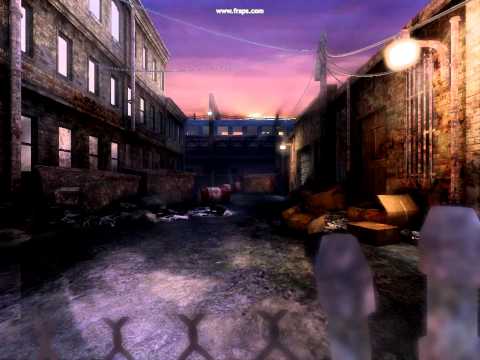 http://www.youtube.com/watch?v=6jeKWuN2TEc[/ame]
Start

Destroyed building

Killer's Apartment

Back Alley

Smelting Plant

Full Level Shot

150,736 Total Triangles
Texture Sheet, a bit less than total limit (image shows all diffuse, decal and particle textures).
http://chrisholden.net/ch_ss_final_textures.jpg
The deadline submission was my priority. I'll be releasing a download of the level soon.
ORIGINAL POST
It looked like so much fun, I've decided to kill two birds with one stone. I'll be creating a city level with assets I can, after the competition, use in my udk game (which currently has no assets). It's the philosophy I'm telling myself to justify all this. Anyway, on with it...
The layout will begin in the street, enter a building which leads to an apartment, out the back window into the alley and into a large warehouse type facility. Definately the kind of stuff seen in Double Dragon or Final Fight.
Here's a little vid from the UDKs
[ame="youtube.com/watch?v=nn4IPLvRDTQ"]Video[/ame]
Going to pound out some materials tonight, maybe a few placeholder assets, MEH-BEH an asset list.
Video Walk-Through (be sure to watch in HD)
[ame]
http://www.youtube.com/watch?v=6jeKWuN2TEc[/ame]Start
Destroyed building
Killer's Apartment
Back Alley
Smelting Plant
Full Level Shot
150,736 Total Triangles
Texture Sheet, a bit less than total limit (image shows all diffuse, decal and particle textures).
http://chrisholden.net/ch_ss_final_textures.jpg

The deadline submission was my priority. I'll be releasing a download of the level soon.
ORIGINAL POST
It looked like so much fun, I've decided to kill two birds with one stone. I'll be creating a city level with assets I can, after the competition, use in my udk game (which currently has no assets). It's the philosophy I'm telling myself to justify all this. Anyway, on with it...
The layout will begin in the street, enter a building which leads to an apartment, out the back window into the alley and into a large warehouse type facility. Definately the kind of stuff seen in Double Dragon or Final Fight.
Here's a little vid from the UDKs
[ame="youtube.com/watch?v=nn4IPLvRDTQ"]Video[/ame]
Going to pound out some materials tonight, maybe a few placeholder assets, MEH-BEH an asset list.
Replies
Pounded out a few materials to lay ground work for the look. It's a bit dirty.
The background buildings came out pretty neat. Got the idea from Double Dragon. The sky is one of Unreal's skies I'm using as placeholder for now. And yes, that's a TV freaking out in the apartment room.
The transition area between sky and play area will be fences and buildings. Then it's prop and go!
[ame]
I'm afraid I'm going to make a better one now. Damn you
[ame]
yea, that's right, I'm going to out-techincal adam & Virtuosic.
TENTACLE!!!!
Updated start area.
Redid the sky (with my own sky pic).
Added metro train to background that appears at a random rate.
Explosion setup at first door (currently using unreal particle as placeholder).
Minor changes to interior apartment area.
Major updates to alley, lots of wires added using UDK's spline system.
Interior of warehouse built as steel mill with lots of particles and death lava.
On a silly note, intro/outro UI pop-ups with competition banner.
Happiest with the alley area currently. This area will be great all propped up.
[ame]
Since the vid quality is really starting to show, here's some fancy screenshots;
http://chrisholden.net/ch_ss_wip01.jpg
http://chrisholden.net/ch_ss_wip02.jpg
http://chrisholden.net/ch_ss_wip03.jpg
I know it's all WIP at the moment but it might be cool to vary the size and shape of the lava pits in the final area.
The train is a really nice touch, maybe raise it up a bit so that you get that nice volumetric light effect when it passes between the sun and the camera.
This will look badass with some more stuff in it.
I think the train should come just slightly later. (1 or 2 seconds)
I watched the video like 5-6 times and didn't notice it until i read Ben's comment. That train is an awesome feature, though.
Ben, I did raise up the train, remodeled the train (needs materials), put in another train going the other way, and built up a nice track for it. The shadows through the windows do some really cool things.
Jason I think it was like that to hide that there were no details. It'll be dialed out once textured assets start falling in place.
Shep & jeffro, yea those default settings are really intense! I've just started scratching the surfaces with those settings this weekend. Chopped most of them in half or more.
ngs616; the train is set to a random play rate, though it was a little high. So I chopped it in half, but then added another train. In a real game setting, this would be cut way down. I left it a bit high so wouldn't miss it in the video.
Other new stuff:
Added a bunch of trash props. Animated the clouds in the sky.
Still a lot of totally blank areas. The exploding door area will be a blown out, rubble area, and the flashing TV room will be moderately furnished. The street itself (what player stands on) need more which I'll likely invest more foreground to help cover.
I invested quite a bit of time in optimization. Seems silly for the challenge, but the idea was to also reduce build times.
I few quick things for you Unreal users, After building lighting, the log tab of the Swarm Agent has a lot of useful information. In the Lighting Build Info, sort by % Lighting Time, select high percentage objects (static meshes), and click Go To to see what this is in the world. I like to check a few of these out to make sure it's things I mean to be at the top, and not a whole bunch of tiny, insignificant things.
Here's a video (this time with sound) Edit: I had no idea frap recorded my music player too, so enjoy the Six Feet Under by accident)
[ame]
Here's a image of the area that got the most work:
Here's a few little things I put together in Kismet for this competition (note: if you were making a great game you'd want to use unreal script for most of this)
First, if you haven't see the camera setup, here it is:
http://chrisholden.net/tutor/3rdudk.jpg
To remove the hud, you can go into the console and type ToggleHUD, or you can tell Kismet to put in this command for you.
Right Click > New Action > Misc > Console Command
You'll need to attach a Player variable to the Target.
Right Click > New Variable > Player > Player, and uncheck All Players.
With this setup, you can use any of those useful console commands without having to put them in every time. For this level, I used SetSpeed 0.6 because I felt the UDK default run speed took me through the level too quickly to get a good look at it. Also, when I'm working on something at the end of the level, I like to set the speed up to around 3 so I can get there quickly.
You can also remove the hud via Cinematic Mode.
Right Click > New Action > Toggle > Toggle Cinematic Mode
If you still want to be able to move, uncheck Disable Movement. I leave Disable Turning on for this level since I want the player to run straight down the level. Hide HUD is automatic with Cinematic Mode, and I also like to use Hide Player for testing things without that robot on the screen.
huzzah!
Oh.. and thanks for your tips on the UDK camera and stuff!
Fantastic level, I love all the minor details you have going on, I feel it really brings it to life. I've been watching this since the beginning and you truly have made leaps and bounds, congrats. Keep up the fantastic work, and don't stop jamming the metal, it always helps produce top quality work
(but then your trains in the back wont line up anymore)
*edit* and by dropping I mean lowering the streetlevel below the window, to make the jump more epic
Maybe there could be a staircase in the apartment that would bring it up a level or two. Seemed silly to me to have an apartment right in front of the entrance door on the first floor anyway.
You should see more apartments, and remember it's a side-scrolling game competition where you fall in a lava vat and die.
Ask and ye shall receive! *WARNING* Extremely placeholder assets.
[ame]
Hey, I'm working FOR you guys.
Looking good so far!
[ame]
Noticed that now a full runtime is longer than 30 seconds (the limit to fraps). With that in mind, I'll probably tighten up a few empty or repetative areas. Also added three secret areas and traps, no spoilers yet!
Good luck with it
Cut out a few large gaps between areas that were eating time and costing resources. Speaking of which, I noticed I'm still pretty handsomely under-budget and haven't don't an optimization pass yet.
Oh, and in this video all post is disabled. And if some materials are funky is because I started setting up a better parent material and don't have any parameters set,
[ame]
[ame]
It looks like this:
I keep seeeing video after video with explosions, materials, and lots of technical breakdowns (and horribly loud music that makes my ears bleed
I mean, don't get me wrong, it's totally cool that you made these elevators and breaking windows work, but in the end the materials are so grungy and rather basic when I compare them to other stuff you did so far. And I really hope you just do it the other way round and make the real detailling assets after you finished all your gimmicks in the scene. Everyone has their way of working and you seem to go the other way round, but I really hope you go the extramile this time, cause it'll be a shame to see the cool effects not shine in an only 75% Holden-Quality-Environment. GoGoGo !!
I already apologize if i may come off rude
On the logical side of things your level design is a bit weird on some places.
You run into a destroyed building with a working elevator and go up like 5 stories and then jump out of the window on the other side which is only 2 stories high. Nitpicking perhaps but if I may suggest you jump out and land on a house roof instead?
Keep up the good work!
My files are safely backed up. I can continue working on them at work or on a new computer (last resort solution). The downside is the large amount of lost time. Things have been going remarkably well lately, so if my computer flaking out is the worst thing happening that's no big deal.
Regardless of all this I will post a download to this level and submit a final on the deadline.
sounds like video card is moving on to the after life
Cleaned up most of the extra materials so more things are using a parent. Total tri counts are around 132k. Still plenty of room props.
Started texturing props. Next targets are door/garage door textures, fix up the elevator area and tv room interior. Hope to knock that out tomorrow night, then it's all down to polish.
[ame]
plenty of bugs in the elevator right now.
Video Walk-Through (be sure to watch in HD)
[ame]
Start
Destroyed building
Killer's Apartment
Back Alley
Smelting Plant
Full Level Shot
150,736 Total Triangles
Texture Sheet, a bit less than total limit (image shows all diffuse, decal and particle textures).
http://chrisholden.net/ch_ss_final_textures.jpg
The deadline submission was my priority. I'll be releasing a download of the level soon.
Ok, here are the final files
http://chrisholden.net/ch_beatemup_final.zip
A few notes:
this is slightly different than the final result I posted due to a few needs of releasing a playable environment. However, it still falls under the challenge's guidelines.
There is a lot of garbage in this level. Not in the artistic sense as that was intended, but on a technical level. There are things that in a professional environment I would have done differently, but for this challenge. I neglected many things on account of the deadline. All detail is maintained strictly within in game camera view. Also made the UDK bot visible for this release as it helps knowing your position.
Installation:
These are raw files, as I do not wish to drop a full installation on anyone with a single level. If you've gotten this far, you probably already know the CH_Beatemup.upk goes in the UDKGame Content directory, and CH_beatemup_Final.udk goes in the Maps folder under that. You can open this content in any UDK build June or newer. You can load it up in game or editor.
Playing:
You'll mostly use W and S keys (forward and backward). Strafing is availible, but limited (may prove useful for secrets)
Secrets, they are in this level. Can you find them all? The game will let you know if you do. Good luck.
EXTRA SPECIAL NOTE:
I did NOT setup a custom Post Process Chain. By Default, it will be very high, and not represent the final look of this level. However...
If you search "console" in the content browser, UTPostProcess_Console Post Process Chain will show up. You may wish to setup your own custom post process chain, but for now, we're going to quickly adjust the default.
Open UTPostProcess_Console (double click it in content browser), select the AmbientOcclusionEffect and lower the number for the Occlusion Power. The other settings are useful as well, but this is the immediate "tone down that black stuff" answer. I lowered this number to 3.
Found them all, that was actually pretty fun lol.
Loved how your final turned out. Making such a dynamic environment with all the pieces you could interact with really made it come to life.