|
created After a specific photoshop brush/texture - water dripping
on 08-26-2010 01:39 AM
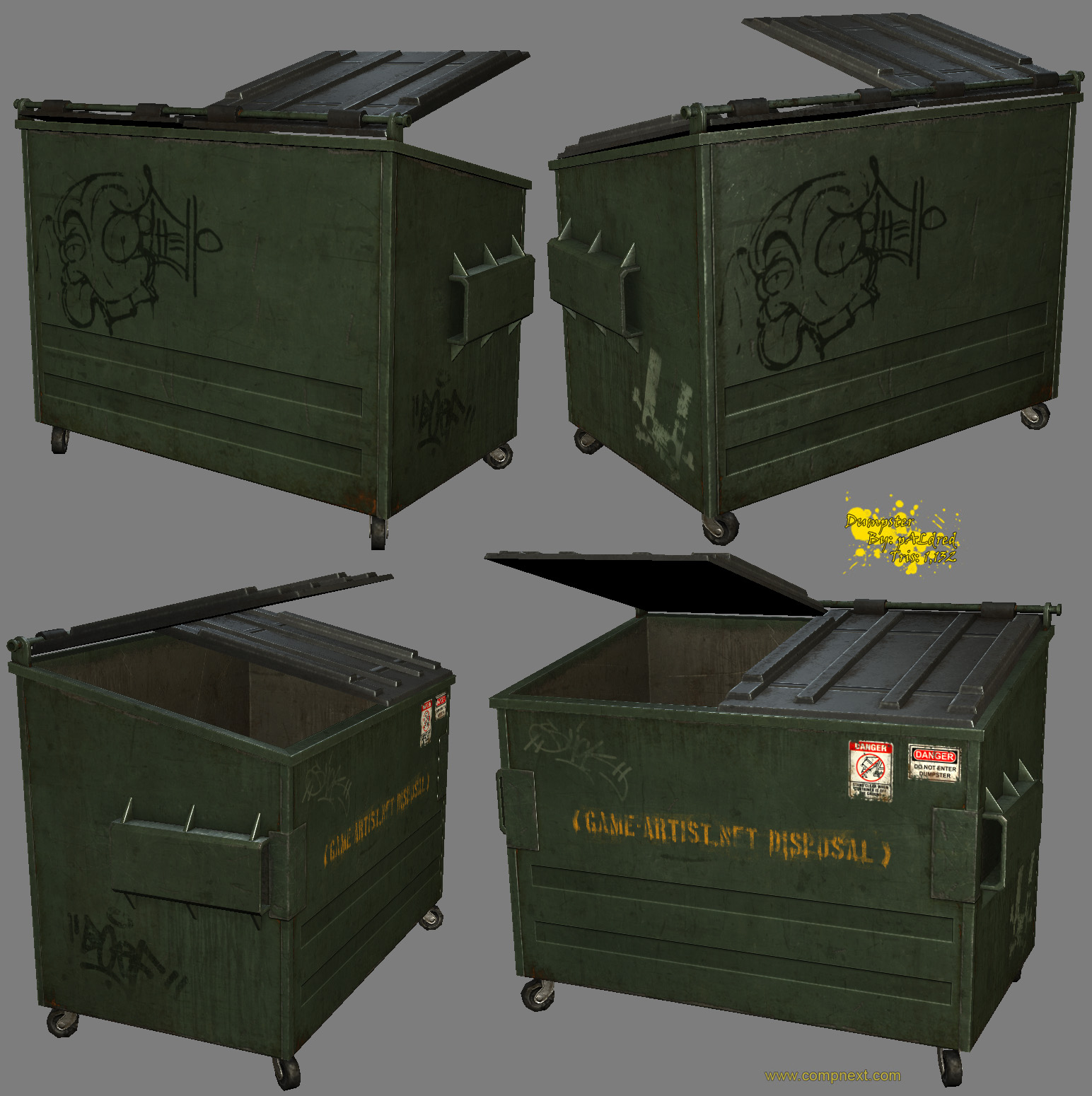
I really do apologise for making a whole thread about this. But I have been looking for so long for a texture/brush that resembles what water looks like after it's dried while dripping down a surface. You can see it used on this dumpster- inparticularly on the bottom left image. I've checked brusheezy and cgtextures, and the closest I can get is dripping paint. Anyone have a good one they can share?
It would be cool if there was a brush topic at least where people could share brushes and techniques they use - just so I didn't have to spam the forum up :P.
Thanks
|
, spline,
139 Posts,
Join Date Aug 2010,
|
You could just draw the streaks, using shift to keep strokes still (if you need), and adding a 'fadeout' value in the brush settings. Then it's just a case of finding the right layer blend, usually 'multiply'.
Honestly, spending ages trying to find the exact brush you need makes the fact that it's then fewer brush strokes redundant.
|
, line,
88 Posts,
Join Date May 2010,
|
Quote:
Originally Posted by mixeh
It would be cool if there was a brush topic at least where people could share brushes and techniques they use - just so I didn't have to spam the forum up :P.
|
Here's a few threads found with the search function...
Photoshop Brushes (post them here!)
Sharing is caring: brushes
Creating a 'Scratches' Brush in PS
|
, veteran polycounter,
2,520 Posts,
Join Date Feb 2009,
Location Hawaii
|
There are whole section of cgtextures.com devoted to both metal and concrete with water residue. Grab a couple of them and overlay them as you see fit.
Alternatively, I find just laying down a fairly solid blob of colour and then using the smudge brush to make streaks usually looks pretty good with a minimal amount of fiddling about.
|
, insane polycounter,
5,647 Posts,
Join Date Oct 2004,
Location Melbourne, Australia
|
water stains are one of my favorite things to paint 
|
, veteran polycounter,
3,856 Posts,
Join Date Oct 2004,
Location Maynard, MA
|
Just turn the "watercolour" option on, since it resembles the style of dryed water. You should look at cgtexutes though ;p
|
, triangle,
291 Posts,
Join Date Feb 2010,
Location Germany
|
Quote:
Originally Posted by mixeh
I really do apologise for making a whole thread about this. But I have been looking for so long for a texture/brush that resembles what water looks like after it's dried while dripping down a surface. You can see it used on this dumpster- inparticularly on the bottom left image. I've checked brusheezy and cgtextures, and the closest I can get is dripping paint. Anyone have a good one they can share?
It would be cool if there was a brush topic at least where people could share brushes and techniques they use - just so I didn't have to spam the forum up :P.
Thanks

|
hey dude, that dumpster is from my friend. you could just ask him and find out how he textured his model.
|
, triangle,
490 Posts,
Join Date Jul 2009,
Location US
|
I recognize it from miles away, he used this one.
A texture that has served even me many times, it's like an old friend.

|
, veteran polycounter,
4,028 Posts,
Join Date Nov 2004,
|
Dude, dripping paint and dripping water are essentially the same, they're both fluids and behave exactly same.
Hell, you can even use some rust texture, like this one
http://cgtextures.com/login.php?&tex...5b7e446f156b6f
Just desaturate, up the contrast, invert, multiply over your map (or screen if it's specmap), erase unnecessary stuff, add some personal touches here and there 
|
, polygon,
617 Posts,
Join Date Aug 2009,
Location Tbilisi, Georgia
|
I've done this with the smudge tool before. Get a rust texture and change it's color to dark blue then scale it as a line, it doesn't have to be perfect, then smudge downwards multiple times with high threshold using a small 1~5 pixel brush, and then set the layer to overlay. Not sure if this is what you are looking for but it should come out looking like the stains on the top of that garbage dump.
|
, line,
69 Posts,
Join Date Mar 2010,
Location San Jose / Silion valley area.
| Thread Tools |
|
|
| Display Modes |
Linear Mode
|
Posting Rules
|
You may not post new threads
You may not post replies
You may not post attachments
You may not edit your posts
HTML code is Off
|
|
|
Copyright 1998-2012 A. Risch
|